When someone logs into WordPress, they almost always do it through two very well-known routes: wp-admin and wp-login.php.
They are part of the normal operation of any website built with WordPress. From there, you manage content, plugins, users, settings, and practically everything that keeps your project running. But they are also two of the most visible points for bots, automated crawlers, and unwanted access attempts.
And that’s where the real problem lies.
Not because these routes are bad in themselves, but because many people take them for granted, use them daily, and never stop to think about what they represent: the entry point and the control center of the entire website.
In a WordPress installation, protecting access is not a minor technical detail. It is a fundamental decision for stability.
What is wp-admin and what is wp-login.php
Although they are often confused, they are not exactly the same.
wp-login.php is the file that displays the login form. In other words, the screen where you enter your username and password to log in.
wp-admin, on the other hand, is the route that takes you to the administration area. That’s where you control the website: pages, posts, plugins, comments, users, settings, and everything important in the project.
Put simply:
wp-login.php is the entry door
wp-admin is the control area
They are connected, yes. In fact, if you try to access wp-admin without being logged in, WordPress redirects you to the login page. But understanding the difference between them helps a lot when it comes to protecting a website more effectively.
The mistake is not using them, but ignoring what they imply
One of the most common mistakes in WordPress is thinking that, since these routes come by default, they are already properly secured.
And they are not.
Precisely because they are standard routes, they are also among the first to be tested in automated attacks. You don’t need to have a large online store or a website with thousands of monthly visits. It’s enough for your WordPress to be online and detectable to start receiving access attempts.
This is where a false sense of normality works against you.
Everything seems fine until symptoms appear: slowdowns, unusual access, suspicious users, internal errors, or strange behavior that no one can explain at first.
What real risks are behind wp-admin and wp-login.php
When access to WordPress is poorly protected, the risk is not just that someone “tries to get in.” The real risk lies in everything that can happen if they succeed or if the installation starts weakening on multiple fronts at once.
Among the most common issues are unauthorized access, creation of suspicious users, installation of malicious files, strange redirects, loss of control of the panel, or a general deterioration of the website’s performance.
And many times, it doesn’t start with an obvious signal.
Sometimes it begins with a panel that feels slower than usual. Or with a website showing errors without a clear reason. Or with a conflict that seems minor, but is actually a reflection of a poorly protected foundation.
Additionally, when an installation becomes unstable, it’s worth looking beyond the CMS and reviewing the technical base it runs on. Often, the issue is not only in WordPress itself, but in previous decisions related to the environment, configuration, or the hosting service where it is deployed. This is where it makes a lot of sense to reinforce this article with an interlink to a more strategic piece of content.
https://jchosting.es/en/hosting-mistakes/
How to protect access to WordPress without overcomplicating things
The good news is that you don’t need to build a complex system to significantly improve access security.
In fact, many of the most effective measures are quite simple when applied correctly.
The first is to use truly strong passwords. Not a predictable variation of your business name, not an easy date, and not a repeated combination. If the main access point is weak, everything else loses strength.
It’s also advisable to limit login attempts. WordPress, if not reinforced, can receive a huge number of automated login attempts. Reducing that noise greatly improves the basic resilience of the installation.
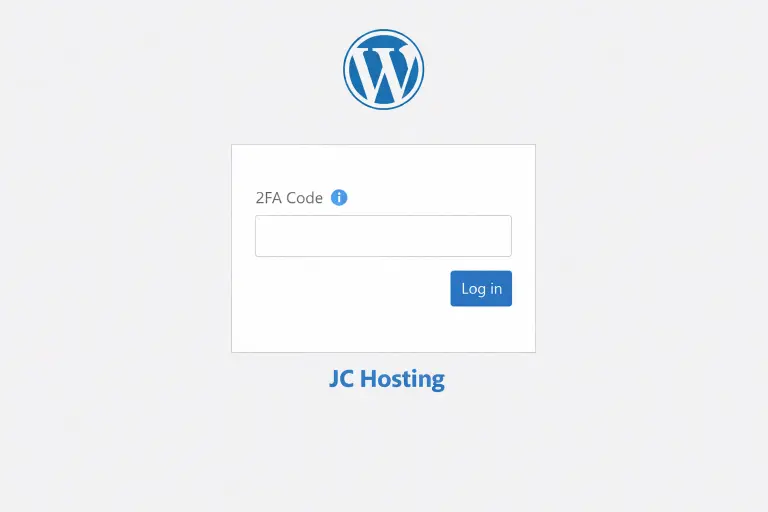
Another important layer is two-factor authentication. It’s not always enabled, but when a website is important for a business, it should stop being seen as an extra. It’s a very useful barrier between compromised credentials and actual access to the panel.
And of course, user accounts need to be reviewed. Many websites carry old accounts, excessive permissions, or access that should no longer exist. And that is also part of the problem.
Keeping WordPress up to date remains one of the best defenses
This is where many websites fail due to inertia.
Updates get postponed, plugins remain unchecked, unused themes stay installed, and little by little, the installation becomes more vulnerable.
Updating WordPress is not just about compatibility or performance. It is a matter of security. WordPress itself makes it clear in its official documentation: a more secure installation depends on updates, hardening best practices, and continuous environment review. Official WordPress security and hardening guide.
Changing the login URL can help, but it does not solve the problem on its own
Sometimes it is presented as the ultimate solution, and it is not.
Changing the access route or hiding the login can reduce some automated noise and stop basic attacks, but it does not replace a solid security structure. If passwords are weak, permissions are poorly managed, or the installation is outdated, changing the URL only covers a small part of the problem.
It is a useful layer. Not the foundation.
Hosting influences much more than it seems
This is one of the most overlooked points.
Many people approach WordPress security as if everything depended on plugins or internal configurations. But the reality is that the environment where the website runs has a huge impact on stability, responsiveness, and the ability to react when something goes wrong.
A weak, overloaded, or poorly maintained hosting service not only affects performance. It can also make recovery harder, complicate incident management, and leave the website more exposed than it appears.
That’s why talking about WordPress security without talking about the technical foundation is only telling half the story.
It’s not just about being able to access the panel. It’s about knowing that behind that panel, there is an infrastructure prepared to support the project properly.
A professional website should not only work, it should also be well protected
That’s the key point.
There are many websites that, from the outside, seem fine. They load, they look correct, and they remain active. But internally, they carry poorly managed access, unchecked users, pending updates, and a technical base that holds until it no longer does.
Understanding what wp-admin and wp-login.php are is not a technical curiosity. It’s understanding where control of your website comes from and why that entry point deserves real attention.
Because when that part fails, it’s not just access that fails. It’s the peace of mind with which you run your project.
At JC Hosting, we understand that WordPress does not just need a place to be hosted. It needs a solid foundation.
That’s why we don’t see hosting as a simple server space, but as an active part of the project’s stability, security, and performance. Infrastructure matters. Support matters. The way the environment is managed also matters.
If you work with WordPress and want a more professional, stable, and growth-ready foundation, at JC Hosting we focus on an environment built for that: Spanish support, well-maintained infrastructure, and a technical approach that goes beyond the typical “open a ticket and wait.”
Because a professional website should not depend on improvised patches.
It should rely on a solid foundation from the very beginning.