Error 422 can feel like a strange failure because it does not always block the entire website. Sometimes it appears when submitting a form, completing a purchase, saving changes in WordPress, connecting an API or processing a specific action within the page.
And that is exactly why it can be confusing.
Your website is not always down. The server may be working correctly, but there is a specific request it cannot process because the data being sent does not match what it expects to receive.
Put simply: the server understands the request, but it cannot process its content.
According to the official MDN documentation on the HTTP 422 code, the server understands the content type being sent and the syntax of the request is correct, but it cannot process the instructions included in that request:
https://developer.mozilla.org/en-US/docs/Web/HTTP/Reference/Status/422
What is error 422?
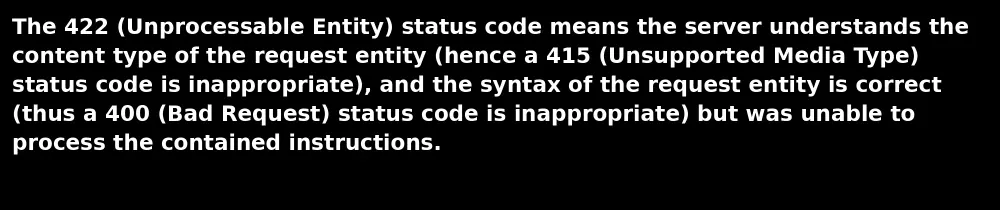
Error 422 belongs to the HTTP 4XX status code family. This means that, in principle, the problem is related to the request the server receives, not necessarily to a general server failure.
Its current technical name is 422 Unprocessable Content, although you may still find it as 422 Unprocessable Entity in many plugins, APIs, hosting panels or older tools.
The key difference is this: the server is not saying “I do not understand what you are sending me”. It is saying “I understand what you are sending me, but I cannot process it as it is”.
| Code | What it means | Where the problem usually is |
|---|---|---|
| Error 400 | The request is malformed | URL, parameters, syntax or request structure |
| Error 401 | Authentication is missing | User, session, token or permissions |
| Error 403 | There is no permission to access | Security rules, permissions or blocking |
| Error 422 | The request is understood, but cannot be processed | Invalid data, incorrect fields, validations, API or forms |
| Error 500 | Internal server failure | PHP, plugins, theme, memory, permissions or server configuration |
That is why error 422 should not be treated as a simple “the website is broken”. Usually, a specific action is failing because something in the data being sent does not meet the required conditions.
A simple example to understand error 422
Imagine you have a contact form with these required fields:
- Name
- Phone
- Message
The user fills in the name, writes the message, but leaves the email empty or enters an email address in an invalid format. The request may reach the server correctly, but the system cannot process it because a required piece of data is missing or because that data does not pass validation.
In that case, the website could return a 422 error.
Not because the server is broken. Not because WordPress has stopped working. Not because the hosting has gone down. But because the action being sent does not meet the necessary conditions to be completed.
Common causes of error 422
Error 422 can have different origins, but it almost always appears when a website, plugin, form or application tries to send data that the server cannot process.
| Cause | Common example | Where to check |
|---|---|---|
| Empty required fields | A form that does not send email, phone or name | Form plugin |
| Incorrect data format | Date, phone, email or postcode sent incorrectly | Form validations |
| WooCommerce conflict | Error when applying a coupon or completing a purchase | Checkout, payments, shipping |
| Problem with an API | A CRM or payment gateway rejects the data sent | API response |
| Misconfigured custom fields | Required hidden field that is not sent | ACF, JetEngine, Elementor, forms |
| Outdated cache | The page shows an old version of the form | Cache plugin or CDN |
| Security rule that is too strict | Firewall blocking specific characters or fields | WAF, ModSecurity, security plugin |
Although the error may appear on screen as a simple number, there is usually a fairly specific problem behind it: a missing field, badly sent data, a validation that is not being met or an integration that is rejecting the information received.
Error 422 in WordPress
In WordPress, error 422 is usually related to specific actions. It is not common for the entire installation to break because of a 422 error. Instead, a specific part of the site usually fails.
It can appear, for example, when submitting a form from Elementor, Contact Form 7, Gravity Forms or Fluent Forms; when saving a configuration; when processing a purchase in WooCommerce; when connecting an external tool; or when sending data from a plugin to an API.
In these cases, the important thing is not to deactivate plugins without a clear reason, but to identify the exact action that triggers the error.
For example:
- If it appears when submitting a form, check the required fields, validations, hidden fields and anti-spam settings.
- If it appears in WooCommerce, check the checkout, coupons, shipping methods, payment gateway and custom fields.
- If it appears when saving changes in WordPress, check permissions, security rules, firewall, optimisation plugins and possible server blocks.
- If it appears when connecting with an external tool, check the API, token, fields being sent and expected format.
The key question is not only “why does error 422 appear?”, but “what was the website trying to do just before it appeared?”
Error 422 in WooCommerce
In an online store, error 422 can be especially problematic because it can directly affect sales. If it appears during the purchase process, it can prevent the customer from completing the order.
The most sensitive points are usually these:
| WooCommerce area | Possible cause of the 422 error |
|---|---|
| Basket | Product not available, incorrect variation or invalid coupon |
| Checkout | Required field empty or poorly validated |
| Shipping | Shipping method incompatible with the address |
| Payments | Gateway rejecting incomplete or incorrect data |
| Coupons | Discount rule misconfigured |
| Custom fields | Field added to checkout that is not processed correctly |
Here, it is important to first review the exact moment when the error appears. It is not the same if it fails when adding a product to the basket as when confirming the payment. Each point indicates a different part of the process.
For example, if the error appears when applying a coupon, the origin may be in the coupon rules, discount configuration or a conflict with another plugin. If it appears when paying, it may be related to the payment gateway, billing details or a checkout validation.
Error 422 in forms
Forms are one of the most common causes of error 422. This happens because many plugins apply validation rules before sending the information.
The form may fail for reasons such as these:
- The email does not have a valid format.
- A required field is not being sent.
- A hidden field is empty.
- The phone number contains characters that are not allowed.
- The attached file exceeds the allowed size.
- The anti-spam system is blocking the request.
- A security rule interprets the content as suspicious.
- An external integration rejects the data received.
A typical case is a form that visually seems correct, but internally is not sending all the fields the integration needs. For example, a CRM may require name, email and legal consent, but the form only sends name and email.
For a person, the form may seem well configured. For the system receiving the data, the request is incomplete.
Error 422 in APIs and integrations
Error 422 is also very common when a website connects with external tools. For example, a payment gateway, a CRM, an email marketing platform, a booking tool, Make, Zapier, n8n or invoicing software.
In an API, a 422 usually indicates that the data sent does not meet the expected rules. The server understands the request, but rejects the content because there is a missing field, an incorrect value or an invalid format.
| Field sent | What the API expects | Possible error |
|---|---|---|
Empty email | Required email | The API rejects the registration |
country: Spain | Code ES | Invalid country |
amount: "49 euros" | Number 49.00 | Amount cannot be processed |
phone: 666 111 222 | Phone number without spaces | Incorrect format |
date: 30/04/2026 | Format 2026-04-30 | Invalid date |
That is why, when the error comes from an API, it is not enough to look at WordPress. You need to review the full response returned by the external tool, because very often that is where the exact field causing the failure appears.
The number 422 tells you the type of problem. The API message usually tells you where the problem is.
How to fix error 422 step by step
Before touching files, deactivating plugins or changing server settings, it is best to follow an organised process. Error 422 is easier to diagnose when you locate the exact action that cannot be completed.
1. Reproduce the error
The first step is to check when it appears. Note the exact URL, the browser, the user with which it happens, the approximate time and the action that triggers the failure.
| Question | Why it matters |
|---|---|
| Does it appear when submitting a form? | It may be a validation problem |
| Does it appear when completing a purchase? | It may be in WooCommerce or the payment gateway |
| Does it appear when saving a page? | It may be firewall, permissions or security |
| Does it only appear on mobile? | There may be a hidden field or script failing |
| Does it appear from an external integration? | It may be the API or the data format |
This step avoids one of the worst ways to solve technical errors: changing things at random.
2. Check the required fields
If the error appears in a form, checkout, registration or private area, review all required fields. Do not only look at what the user sees on screen; also check hidden fields, conditional fields and fields that are sent automatically.
In WordPress, this is especially important when using advanced forms, dynamic fields, CRM integrations or customised checkouts.
A field may not appear visually to the user, but it may still be required by the system processing the request.
3. Check the data format
A piece of data may be present, but arrive in the wrong format. This is very common with phone numbers, dates, amounts, provinces, countries, postcodes, emails and custom fields.
For example, a tool may expect the country as ES, but the website sends Spain. For a person, it may mean the same thing. For an API, it does not.
The same can happen with dates, prices or phone numbers. The content may seem correct, but it is not in the format the system expects.
4. Review related plugins
If you are using WordPress, do not start by deactivating everything. Start with the plugins that are directly involved in the action that fails.
Recommended order:
- Form plugin.
- WooCommerce or checkout plugin.
- Payment gateway.
- Security plugin.
- Cache plugin.
- Optimisation plugin.
- Custom fields plugin.
- Related external integration.
Ideally, these tests should be carried out in staging so you do not affect the live website. If the error appeared just after updating a plugin or changing a setting, start there.
5. Check the server logs
Error logs can give you information that does not appear on screen. From cPanel, your hosting panel or the available log system, check what happens at the exact time the error appears.
Look for references to:
- Specific plugins.
- PHP files.
- Blocked endpoints.
- Validation errors.
- Rejected requests.
- Activated security rules.
- External API responses.
Without logs, you often only see the symptom. With logs, you can get closer to the real origin.
6. Clear the cache carefully
Cache can cause strange behaviour when the website shows an old version of a page, form or checkout that no longer matches the current logic of the site.
Clear the cache in this order:
- WordPress plugin cache.
- Server cache.
- Browser cache.
- CDN cache, if you use Cloudflare or another tool.
- CSS and JavaScript optimisation or minification cache.
Then test the exact same action that generated the error. If it disappears, there was probably a cached version causing the conflict. If it continues, you need to keep reviewing validations, plugins or integrations.
7. Review security rules
Sometimes the 422 error appears because a security rule blocks a request it considers suspicious. This can happen with forms that send URLs, long texts, special characters, HTML code, attached files or fields with unusual content.
It is not about disabling website security. It is about identifying whether a specific rule is blocking a legitimate action and adjusting it correctly.
Quick checklist to diagnose error 422
You can use this table as a quick guide:
| Step | What to check | Priority |
|---|---|---|
| 1 | Exact URL where the error appears | High |
| 2 | Action that triggers the failure | High |
| 3 | Form, checkout or plugin involved | High |
| 4 | Required fields and hidden fields | High |
| 5 | Format of email, phone, date, country or amount | High |
| 6 | Recent changes in plugins or theme | Medium |
| 7 | WordPress, server or CDN cache | Medium |
| 8 | Server logs | High |
| 9 | Full API response | High if there is an integration |
| 10 | Firewall or security rules | Medium |
Is error 422 the hosting’s fault?
Not always.
In fact, very often the hosting is not the origin of the problem. The server simply returns the error because the website, plugin, form or API cannot process the data being sent.
However, good hosting does make a difference in the diagnosis. When you have access to clear logs, backups, real technical support, cPanel, a stable environment and the right tools, locating the problem is much easier.
The difference is not only that the website works when everything is going well. The difference is having visibility when something fails.
What to check before asking for support
Before contacting support, write down three things:
- Which URL the error appears on.
- What you were doing just before it happened.
- Whether you have recently changed anything on the website.
For example: updating a plugin, modifying a form, changing WooCommerce, activating cache or changing security rules.
With this information, it will be much easier to review the logs and find the origin of the error without wasting time on unnecessary tests.
How to prevent future 422 errors
Not all 422 errors can be avoided, but you can greatly reduce the risk if you keep a tidy technical foundation.
Important recommendations:
- Keep WordPress, plugins and theme updated, but test important changes in staging.
- Avoid installing several plugins that do the same thing, especially for forms, security, cache and checkout.
- Carefully review required fields in forms and purchase processes.
- Document external integrations and the fields each form sends.
- Check API responses when connecting external tools.
- Use a reliable backup system.
- Review logs when an error appears, not only the visible part of the website.
- Work with hosting that is not a black box.
At JC Hosting, we help you build a clearer technical foundation
When error 422 appears, the problem is not always that the website is down. Very often, the issue is that a specific part of the system is blocked because something does not fit: a piece of data, a validation, a plugin, an integration or a security rule.
At JC Hosting, we work with infrastructure designed for professional websites: NVMe drives, LiteSpeed, cPanel, daily backups and support in Spanish. But above all, we work with one clear idea: your hosting should not be a black box.
Because when your website fails, you need more than space on a server. You need a technical foundation that allows you to understand what is happening, fix the problem and keep running.