If your hosting provider has warned you that you’ve reached your CPU limit, it’s normal to be concerned.
Your website starts slowing down, some pages don’t load properly, or it simply stops responding at certain moments. And the first thought is usually: “something is broken.”
But in most cases, nothing is actually broken. What you’re seeing is a clear signal: your website is consuming more resources than your current environment can handle.
And understanding this changes completely how the problem should be approached.
What Reaching the CPU Limit Really Means
Every request your website receives forces the server to execute processes: interpreting code, querying the database, and generating a response. All of this consumes CPU.
In shared hosting, these resources are limited to keep things stable across all accounts. When a website exceeds its limit, the system temporarily restricts processes.
This is not a server error, it’s a control mechanism. That’s why what you usually notice is not a full crash, but behaviors like:
- inconsistent loading times
- slow responses in the admin panel
- occasional errors during peak activity
How to Identify If CPU Usage Is Really the Problem
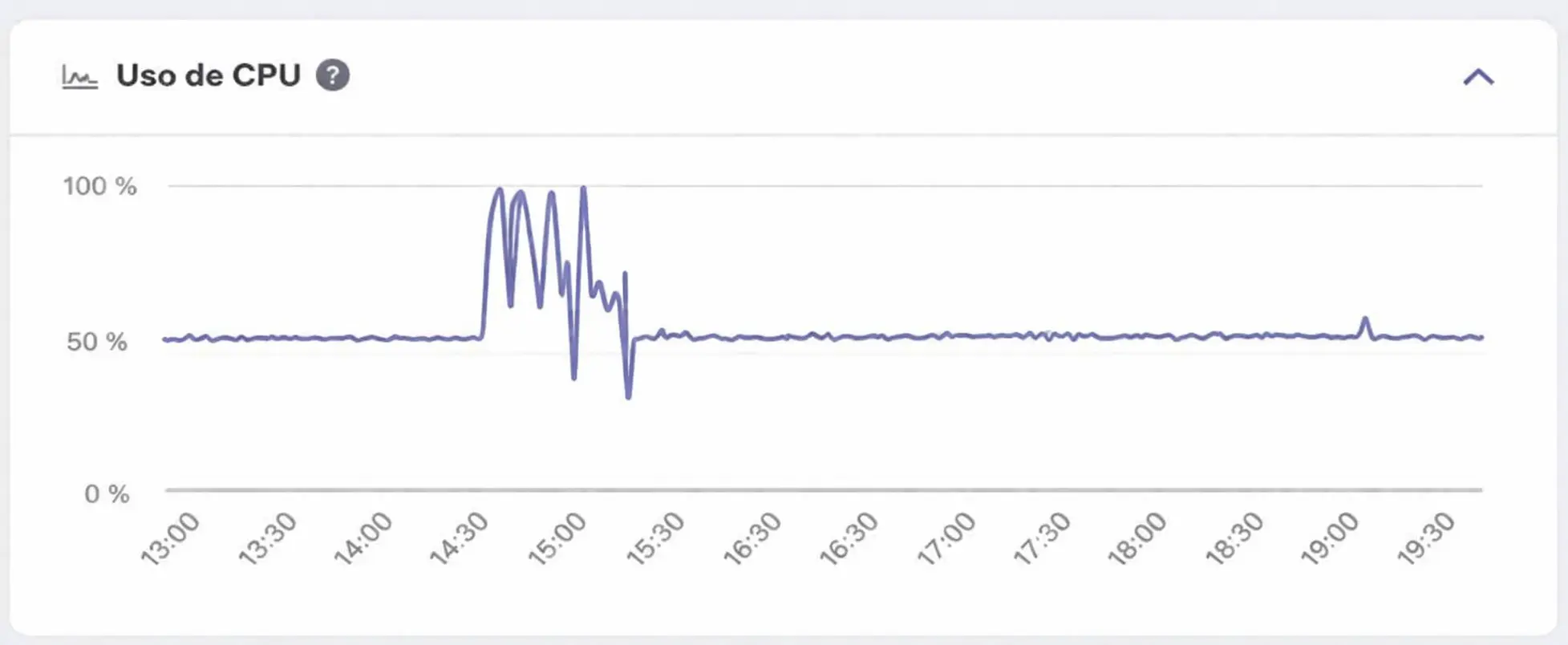
Not every performance issue is related to CPU, but when it is, it usually follows a clear pattern.
The website is not down, but it behaves inconsistently.
Performance drops at specific times.
The admin panel is also affected.
And you can see usage spikes in your hosting panel.
At JC Hosting, when we analyze these situations, the first thing we look at is whether the usage is temporary (spikes) or sustained over time, because each points to a different cause.
The Most Common Causes (and How to Tell Them Apart)
Not all websites consume CPU for the same reason, and treating every case the same usually leads to wrong decisions.
Plugins That Generate Constant Load
It’s not just about how many plugins you have, but how they behave.
Some plugins run queries on every load, constantly interact with the database, or depend on external processes. This creates continuous resource consumption, even with low traffic.
Missing or Poorly Configured Cache
Without caching, every request forces the page to be rebuilt from scratch. That means PHP execution, repeated database queries, and longer response times.
A properly configured cache reduces most of this load, but not all setups are done correctly.
Optimize hosting performance
Beyond cache and plugins, the server itself allows for adjustments. Learn how to optimize hosting performance from its core layer: PHP configuration, process limits, and server version.
Background Processes (cron jobs, backups, tasks)
This type of consumption doesn’t depend on user activity. These are internal processes that run automatically, like backups or scheduled tasks, and they can keep the server busy constantly without being obvious.
Natural Project Growth
Your website has grown: more traffic, more content, more usage… and a limit that was never reached before starts becoming normal.
This is not an issue, it’s evolution.
How to Reduce CPU Usage Effectively
It’s not about applying every possible optimization, but about acting where it actually makes an impact.
Reviewing plugins is the first step, but not just removing them. You need to understand what they do. Then, validate your cache. Activating it is not enough, you need to confirm it’s actually reducing load.
It’s also important to review automated processes. Many projects run tasks more frequently than necessary.
And finally, keeping everything updated helps, but it shouldn’t be your only approach.
When the Problem Is No Longer the Website
If the issue persists after optimizing the website, insisting on more tweaks is not the solution. It means your environment is no longer aligned with your project.
This is where you need to change your approach.
Can You Increase CPU in Shared Hosting?
No.
In shared hosting, resources are defined to maintain overall stability. They cannot be increased individually without changing the type of environment.
That’s why, when the limit is reached consistently, the real solution is not more optimization, but moving to an environment that matches your project.
Hosting plans with more CPU resources
If CPU spikes remain common after optimizing, the next logical step is to consider a plan with more allocated resources. Not all projects work in just any environment. This is where having visibility of hosting plans with more CPU resources makes the difference between continuing to have problems or making your website fly.
How to Make the Right Decision
If the issue is recent, optimize.
If it’s constant, analyze.
If the project has grown, adapt the environment.
There’s no single answer, but there is a clear framework.
Choose the right type of hosting
Part of this diagnosis is knowing whether your project needs optimization or whether you should choose the right type of hosting from the start. Not all projects perform well in the same environment.
How We Handle This at JC Hosting
These situations are common in projects that are starting to scale.
At JC Hosting, the approach is always the same:
- identify the real source of the resource usage
- distinguish between a technical issue and natural growth
- and act accordingly
Because optimizing an already optimized website doesn’t solve anything.
And scaling without a real need doesn’t either.
The CPU Limit Is Not an Error
It’s a signal that something has changed in your website or its environment.
Sometimes it will be a misconfiguration, other times a process that was overlooked.
And in many cases, it’s simply a natural consequence of growth.
The difference lies in understanding what’s actually happening before taking action.
Because optimizing when it’s not needed doesn’t solve anything.
And scaling without criteria doesn’t either.
When the diagnosis is correct, the solution is usually much simpler than it seems.