There’s a very specific moment when doubts start to appear. Your website is live, everything seems fine… but it loads slowly. Sometimes more, sometimes less. There’s no clear error, but something isn’t working as it should.
At that point, most people start changing things without a clear direction: plugins, images, design… hoping something works. The problem is that if you don’t know where the issue comes from, you’re just guessing. And this is where a metric that often goes unnoticed comes in—and changes everything: TTFB.
What is TTFB and why it matters
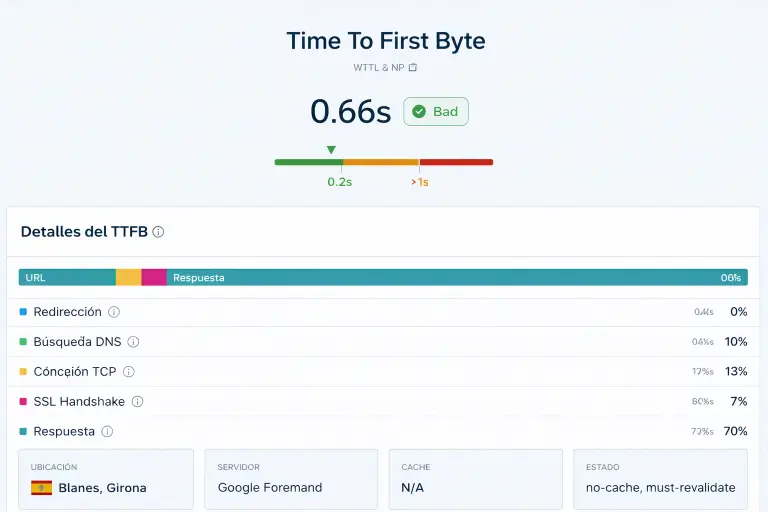
TTFB (Time To First Byte) is the time it takes for the server to start responding when someone visits your website. It doesn’t measure how long the full page takes to load, but something more fundamental: how long the server takes to react.
That first response is the starting point for everything that follows. If there’s a delay there, everything else is affected, and the user feels it from the very first second.
That’s why in any serious performance analysis, TTFB is one of the first metrics to check.
Why a high TTFB is a real problem
When TTFB is high, the slowdown doesn’t come from design or images—it comes from the foundation. This has direct consequences: it affects overall loading speed, damages user experience, impacts SEO, and most importantly, reduces conversions.
A website can be well built, well designed, and well positioned, but if the server is slow to respond, users notice it before anything even loads. And that first impression often determines whether they stay or leave.
In many projects that come to JC Hosting, this is exactly the starting point: websites that “work,” but lose performance from the very first millisecond.
What TTFB values are considered normal
| TTFB | Status |
|---|---|
| < 200 ms | Excellent |
| 200 – 500 ms | Good |
| 500 – 800 ms | Needs improvement |
| > 800 ms | Clear problem |
If you’re in that last range, this isn’t about small optimizations. There’s a structural issue to fix.
Signs your TTFB may be affecting your website
There are patterns that appear more often than you’d think. If any of these sound familiar, TTFB might be the issue:
- Your website takes time to start loading, even if it becomes fast afterward
- Tools like PageSpeed show good results, but it still feels slow
- Sometimes it loads quickly, other times it doesn’t, without a clear reason
- You’ve optimized WordPress, but nothing really improves
- Even simple pages feel delayed
This kind of behavior is not random. It’s a symptom.
When the problem is your website
Before blaming the hosting, you need to check whether your website is causing the delay. A poorly optimized WordPress setup, heavy themes, or misused builders can increase response time.
Too many plugins—or plugins making constant external requests—also add unnecessary load. Add to that an unmaintained database and no caching system, and the server is forced to process every visit from scratch.
In these cases, the server responds slowly because it has too much work to do.
When the problem is your hosting
If your website is reasonably optimized and TTFB is still high, the issue shifts to the infrastructure.
If you’ve already optimized the basics and TTFB is still high, it’s not a WordPress problem. It’s an infrastructure problem.
Overloaded servers create waiting times. Poor server location adds latency. Limited resources like CPU, RAM, or disk speed directly affect response time. And weak infrastructure simply can’t deliver consistent performance.
This is where the difference between generic hosting and performance-focused environments becomes clear. At JC Hosting, for example, the focus is on avoiding these bottlenecks from the ground up.
What to do when the problem is the server
If you’ve already ruled out that the source lies within your website, it’s time to focus on the infrastructure. This isn’t about minor tweaks, but about reviewing the core factors that impact response time: allocated resources, server location, disk type, web server configuration, and saturation level.
Optimising this doesn’t always mean switching hosting providers. Sometimes it’s simply a matter of improving server performance within the same environment: upgrading resources, enabling server-side caching, migrating to a plan without overcrowding, or reviewing the software stack the server runs on.
In any case, it’s a decision that should be based on data, not guesswork.
Why servers in Spain reduce TTFB
There’s one factor often overlooked when analysing response time: the physical distance between the server and the person visiting the website. Every kilometre adds milliseconds. It’s not theory — it’s pure latency.
When the server is in Spain and the traffic is too, that distance shrinks dramatically. The result is a lower TTFB right from the start, without touching anything else. It doesn’t depend on optimisations, plugins or configurations: it’s a built-in advantage.
That’s why servers in Spain reduce TTFB directly for national visitors. It’s not a partial or conditional improvement: it’s a real reduction in the time the server takes to react, simply by being closer.
This is one of the reasons why at JC Hosting we work with infrastructure located in Spain and optimised for this traffic profile. Because if your audience is here, your server should be too.
How Redis reduces TTFB in WordPress
There’s a layer of optimisation that goes beyond the server and its location: object caching with Redis. While page caching stores the full HTML, Redis keeps the results of repetitive database queries in RAM memory: options, menus, products, WooCommerce sessions… Everything WordPress queries over and over again on every page load.
The impact on TTFB is direct. If the server doesn’t have to wait for MySQL to process dozens of queries, it responds sooner. In WordPress environments with WooCommerce and heavy plugins, TTFB reductions of between 23% and 27% have been measured just by enabling Redis Object Cache. In real cases of stores with thousands of products, TTFB has dropped from over 1 second to just over 500 ms after implementing this caching layer.
That’s why Redis reduces TTFB in WordPress: it takes the load off the database and speeds up the delivery of dynamic data from the very first moment. It doesn’t replace a good infrastructure or a well-located server, but it complements them decisively. It’s one of those improvements that, when activated, you can actually feel.
How to make your WordPress faster
At this point, the question is no longer whether your site can be faster, but where to start. And the order matters. Making your WordPress faster isn’t about touching everything at once, but about following a logical sequence:
- Infrastructure: without a solid foundation, everything else falls apart. A properly sized server, located close to your audience, makes the difference from the very first moment.
- Caching: first page caching, then object caching. The right combination takes the load off the server and speeds up data delivery.
- Internal optimisation: plugins, images, database and theme. But only once the previous two points are sorted.
The most common mistake is starting with point 3 without having addressed 1 and 2.
If you want a step-by-step guide on how to make your WordPress faster, here it is.
How to identify the issue without wasting time
The right approach is not to change everything, but to eliminate variables. First, measure your TTFB using a reliable tool. Then make sure you have basic optimization in place: caching, controlled plugins, and a clean structure.
If TTFB is still high after that, the issue is not your website—it’s the server. This is key because it prevents one of the most common mistakes: trying to fix a hosting problem from within WordPress.
The most common mistake
Many people try to fix performance by adjusting things that don’t address the root cause. They change plugins, optimize images, tweak the design… but if the server is slow, those changes have limited impact.
It’s effort without direction, and the real problem remains.
Understanding TTFB changes how you make decisions
TTFB is not just a technical metric. It’s a way to understand whether your website is built on a solid foundation or limited by its environment.
It helps you decide whether you need to optimize—or change your setup entirely. And that difference is what determines whether you improve slightly or make a real performance leap.
A clear way to evaluate your situation
At JC Hosting, we analyze your website, measure your TTFB, and clearly tell you whether the issue lies in your WordPress setup or your hosting. No guesswork, no wasted time.