Images are often one of the heaviest parts of a web page.
A photo that is too large, an unoptimised banner or a gallery full of images can make a website take longer to open, especially on mobile.
And when a website takes too long to load, the problem is not only technical.
It also affects the user experience, the trust the page conveys and SEO performance.
This is where WebP comes in: an image format designed to make images weigh less without an obvious loss of visual quality.
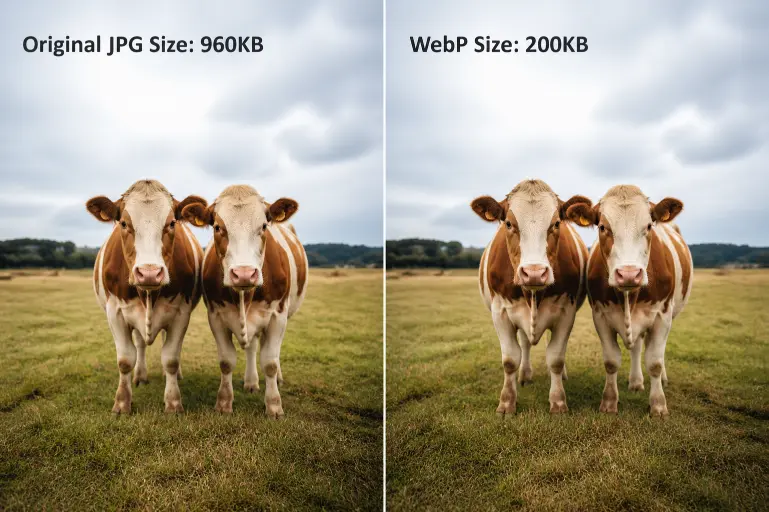
What is WebP
Is an image format created for the web. Its goal is to reduce the weight of images compared to traditional formats such as JPG or PNG, while maintaining good visual quality.
Put simply: a WebP image can look almost the same as a JPG or PNG image, but take up less space.
According to Google’s official WebP documentation, this format supports both lossy and lossless compression, making it a very interesting option for improving website performance.
This makes WebP especially useful for WordPress websites, online shops, blogs, corporate websites and any project where images carry a lot of weight.
WebP explained simply
To understand it better, we can compare it with other common formats:
| Format | Common use | Main advantage | Common problem |
|---|---|---|---|
| JPG | Photographs | Good quality with reasonable weight | Loses quality when compressed |
| PNG | Images with transparency | Good sharpness | Can be very heavy |
| SVG | Logos and icons | Lightweight and scalable | Not suitable for real photographs |
| WebP | Optimised web images | Less weight and good quality | Not always ideal as an original file |
| AVIF | Advanced optimisation | Very good compression | May be less practical in some environments |
Does not mean you have to stop using all other formats.
It means that, for many images on a website, it can be a more efficient option.
Why WebP is important for a website
A website can be well designed, have good copy and offer a good service, but if it takes too long to load, users notice.
And they usually notice it at the worst moments:
- When they visit from mobile.
- When they are comparing several companies.
- When they want to view a product page.
- When they open a page with many images.
- When they have poor coverage or a slow connection.
In many cases, the problem is not a single image, but the sum of many poorly optimised images.
| Common situation | Consequence |
|---|---|
| Photos uploaded directly from a mobile phone | They weigh more than necessary |
| Huge banners on the homepage | They delay the initial load |
| PNG files used as large images | They consume too many resources |
| Unoptimised galleries | The page becomes heavy |
| Featured images that are too large | The blog loads more slowly |
| Product pages with many photos | The online shop loses fluidity |
WebP helps reduce that weight and improves the speed perceived by the user.
Benefits of using WebP images
1. It reduces image weight
The main benefit is that it allows images to take up less space.
This is especially noticeable on pages where visuals play an important role:
- Homepage.
- Landing pages.
- Service pages.
- Product pages.
- Blog posts.
- Portfolios.
- Galleries.
- Banners.
The less a page weighs, the less data the browser has to load.
And that usually translates into a faster website.
2. It improves loading speed
When an image weighs less, the browser needs less time to download it.
This does not only improve scores in performance tools. It also improves something more important: the real feeling users have when browsing.
A website that responds quickly conveys more professionalism.
A website that takes too long creates doubts.
https://jchosting.es/en/ttfb-hosting-3/
3. It helps technical SEO
WebP does not rank a website by itself.
Google is not going to move a page up just because its images are in WebP.
But a faster, lighter and easier-to-use website usually has a better technical foundation.
WebP can help with aspects related to:
- Loading speed.
- Mobile experience.
- Core Web Vitals.
- Resource consumption.
- Overall page performance.
In other words, WebP is not “magic SEO”.
It is one more piece within a technically well-prepared website.
4. It reduces resource consumption
Every time a user enters your website, the server has to deliver files: text, images, stylesheets, scripts and other resources.
If images weigh less, the website consumes less bandwidth and loads more efficiently.
This can be especially useful for:
| Type of website | Why WebP can help |
|---|---|
| Ecommerce | Many product photos |
| Blog | Many featured images |
| Photography | Heavy visual galleries |
| Restaurants | Menus, dishes and photos of the premises |
| Estate agencies | Many images per property |
| Academies | Pages, courses and landing pages |
| Local businesses | Photos of services, team and facilities |
WebP in WordPress
WordPress allows you to upload and use WebP images, so you can add them to the media library just as you would upload a JPG or PNG image.
But there is one important point:
Being able to upload WebP does not mean your website is automatically optimised.
To do it properly, you also need to review other elements.
| Element | What you should review |
|---|---|
| Dimensions | The image should not be larger than necessary |
| Weight | The file should be compressed |
| Format | WebP should make sense in that case |
| File name | It should be descriptive |
| ALT text | It should explain the image properly |
| Cache | The website should serve resources efficiently |
| Hosting | The server should respond quickly |
A huge image in WebP format can still be a bad image for the web.
The format helps, but it does not replace proper optimisation.
When to use WebP
WebP makes a lot of sense when we are talking about images designed to be displayed on a web page.
You can use it for:
- Photographs on a corporate website.
- Featured blog images.
- Banners.
- Product photos.
- Service images.
- Galleries.
- Screenshots.
- Visual assets on a landing page.
In general, if an image is part of your website’s visual experience and weighs too much, WebP can be a good option.
When not to use WebP
WebP is not always the best alternative.
There are cases where another format may make more sense.
| Case | Best option |
|---|---|
| Vector logos | SVG |
| Simple icons | SVG |
| Original photos for editing | JPG or RAW |
| Master design files | PSD, AI, PNG or similar |
| Images that need heavy editing later | Original format |
| Very simple graphic elements | SVG |
The key is not to convert everything to WebP.
The key is to use each format where it makes sense.
How to optimise WebP images properly
Before converting all the images on your website, it is worth following an order.
1. Detect the heaviest images
Do not start by converting everything without criteria.
First, review which images are affecting performance the most.
They are usually found in:
- The homepage.
- Service pages.
- Landing pages.
- Product pages.
- Posts that receive the most traffic.
- Galleries.
- Main banners.
2. Adjust the dimensions
This point is very important.
If an image is displayed on the website at 900 pixels wide, there is no point uploading it at 4000 pixels wide.
Before converting to WebP, review the real size of the image.
| Image use | Practical recommendation |
|---|---|
| Featured blog image | Adjust it to the real size used by the theme |
| Homepage banner | Optimise weight and dimensions |
| Product photo | Maintain quality, but without excessive size |
| Icon | Consider SVG before WebP |
| Gallery | Reduce dimensions and compress |
3. Convert to WebP
Once the image has a logical size, you can convert it to WebP.
You can do this manually or through WordPress optimisation plugins.
In many cases, the most practical option is to use a configuration that keeps the original file and creates a WebP version to serve on the website.
4. Review visual quality
Optimising does not mean destroying the image.
Excessive compression can make the photo lose detail, look blurry or convey a poorer brand image.
The goal is to find balance:
| Goal | Desired result |
|---|---|
| Less weight | Lighter website |
| Good quality | Professional image |
| Correct size | Less unnecessary load |
| Suitable format | Better performance |
5. Make a backup
Before converting images in bulk, make a backup.
This is especially important if you have:
- An online shop.
- Many old images.
- A website with galleries.
- A blog with years of content.
- A project where images are key.
That way, if something goes wrong, you can go back.
Common mistakes when using WebP
| Mistake | Why it can be a problem |
|---|---|
| Converting the whole website without a backup | You can lose files or break paths |
| Using WebP for vector logos | SVG is usually better |
| Uploading huge images in WebP | They still weigh too much |
| Compressing too much | The image loses quality |
| Not checking the mobile version | The real problem is usually there |
| Thinking WebP fixes everything | Speed depends on more factors |
| Not configuring cache | The website does not take proper advantage of the optimisation |
WebP helps, but it does not perform miracles.
If the website has a heavy theme, too many plugins, poor cache or slow hosting, converting images will only solve part of the problem.
Does WebP improve SEO?
Can help SEO indirectly.
Not because this format is a magic ranking factor, but because it can improve page performance.
And a faster page usually offers a better experience.
This can influence important aspects such as:
- Faster loading on mobile.
- Better user experience.
- Lower abandonment.
- Better technical performance.
- Better perception of quality.
That is why WebP should be seen as part of technical SEO, not as a complete solution.
A well-optimised website needs more pieces working together:
| Area | What it contributes |
|---|---|
| Optimised images | Less weight |
| Fast hosting | Better server response |
| Cache | Less repeated loading |
| Clean WordPress | Fewer conflicts |
| Controlled plugins | Less consumption |
| Well-maintained database | More fluidity |
| Good content | More value for the user |
WebP and hosting: why they go hand in hand
Optimising images is important.
But website speed does not depend only on images.
It also depends on the technical foundation where the website is hosted.
A website with this format images can still load slowly if the server responds late, if the cache is poorly configured or if WordPress is overloaded with plugins.
That is why performance must be seen as a system.
| Element | What it improves |
|---|---|
| WebP | Reduces image weight |
| LiteSpeed | Improves WordPress performance |
| NVMe | Speeds up data reading and writing |
| Well-configured cache | Reduces server load |
| Stable hosting | Improves overall response |
| Technical support | Helps detect real problems |
At JC Hosting, we work precisely from that logic: it is not just about hosting a website, but about offering a technical foundation prepared so WordPress can work with stability, speed and close support.
So, is WebP worth using?
Yes, for most modern websites it is worth using.
Especially if you have:
- A WordPress website.
- An online shop.
- A blog with many images.
- A visual corporate website.
- A page that loads slowly on mobile.
- Galleries or portfolios.
- Product pages with several photos.
- Performance problems in PageSpeed.
But it is worth doing it with criteria.
It is not about converting all images just for the sake of it.
It is about reviewing which pages are important, which images weigh the most and which changes can truly improve the user experience.
Quick summary
| Question | Answer |
|---|---|
| What is WebP? | An image format optimised for the web |
| What is it for? | To reduce weight and improve speed |
| Does it work in WordPress? | Yes, if the environment supports it correctly |
| Does it replace JPG and PNG? | Not always, it depends on the use |
| Does it improve SEO? | It can help indirectly |
| Should I convert the whole website? | It is better to start with the most important images |
| Is using WebP enough? | No, hosting, cache and configuration also matter |
Frequently asked questions about WebP
Is WebP better than JPG?
In many web images, yes. WebP usually achieves lighter files than JPG with similar quality.
Is WebP better than PNG?
It depends on the case. For large images, it can be better because it weighs less. But for certain graphics, work files or specific needs, PNG may still make sense.
Can I use WebP in WordPress?
Yes. WordPress allows you to use WebP images, although it is advisable to support it with good cache, optimisation and hosting configuration.
Do I have to convert all images to WebP?
Not necessarily. The best approach is to start with the heaviest images and the most important pages on the website.
Does WebP improve loading speed?
Yes, it can help a lot if the current images weigh too much. But speed also depends on hosting, cache, plugins and the general WordPress configuration.
At JC Hosting, we help you build a faster website from the foundation
WebP can be a good step to improve website speed.
But it should not be the only one.
A fast website needs optimised images, yes. But it also needs stable hosting, good cache configuration, enough resources and a well-maintained WordPress installation.
At JC Hosting, we offer hosting prepared for WordPress, with servers in Spain, NVMe drives, LiteSpeed, backups and support in Spanish.
Because a website should not depend on patches to load well.
It should have a solid technical foundation from the beginning.