Choosing hosting for PrestaShop is not the same as choosing hosting for a simple corporate website. An online store works with products, categories, images, customers, carts, payment methods, carriers, orders, modules and internal processes that are not always visible from the outside, but that consume resources every time someone browses or buys.
That is why hosting should not be chosen only because of the price, the disk space or the fact that it lets you install PrestaShop in one click. That can help you get started, but it does not guarantee that your store will load quickly, that the admin panel will feel smooth or that the checkout will respond properly when real visitors arrive.
The important question is not whether you can install PrestaShop on that hosting. The important question is whether that hosting can support a PrestaShop store when it starts to grow.
Why PrestaShop needs a solid technical foundation
PrestaShop is a powerful e-commerce platform. It allows you to work with large catalogues, product combinations, pricing rules, discount codes, different payment methods, carriers, registered customers, taxes, languages and external modules.
That flexibility is a major advantage, but it also requires a more carefully prepared infrastructure. A basic installation may work well at the beginning, especially if the store has few products and few modules. The problem usually appears when the project starts to move: you upload more images, add filters, install payment modules, activate analytics tools, work on SEO, launch campaigns or start receiving orders more frequently.
At that point, a limited hosting plan starts to show its weaknesses. The store may load more slowly, the admin panel may take longer to respond, imports may fail or the checkout may become unstable. And in e-commerce, every second of waiting can affect user trust and conversion.
What good PrestaShop hosting should include
Good PrestaShop hosting is not defined only by the number of GB included in the plan. Space matters, but it is not the only factor. In an online store, the PHP version, available memory, database, disk type, process limits, cache, backups and technical support also have a direct impact.
To make it clearer, this table summarises the main points:
| Element | Why it matters in PrestaShop | What you should check |
|---|---|---|
| PHP | PrestaShop depends heavily on the PHP version to work properly | The hosting should allow compatible versions and changes from the control panel |
| Database | Products, orders, customers, carts and settings depend on it | Stable and well-configured MySQL or MariaDB |
| Memory | Affects imports, modules, combinations and the admin panel | Enough memory_limit for e-commerce |
| NVMe disk | Improves response when moving files, images and cache | Fast storage, not just a lot of space |
| Backups | A store changes constantly and may need restoring | Frequent, clear and recoverable backups |
| SSL | Essential for an online store and for building trust | HTTPS active and properly configured |
| Support | PrestaShop issues can have different causes | Technical support capable of narrowing down incidents |
| Scalability | The store may grow in catalogue, traffic and orders | Possibility to upgrade without traumatic migrations |
1. Compatible PHP that is easy to manage
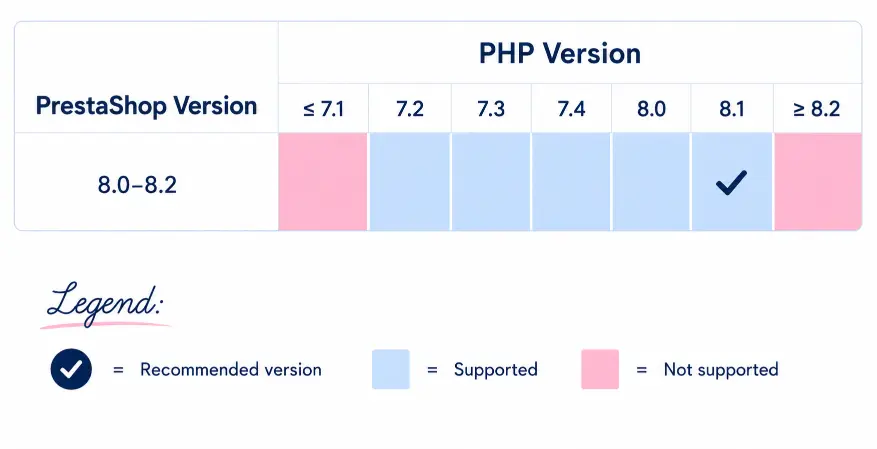
PrestaShop needs to work with PHP versions that are compatible with the installed version of the platform. This matters because a store may work well with one specific version and partially break if PHP is changed without checking modules, theme or compatibility.
That is why good PrestaShop hosting should make it easy to manage the PHP version. Ideally, you should be able to change it from the control panel, test compatibility and adapt the technical environment to the real needs of the store.
This is not about always using the latest version without thinking. It is about having technical flexibility. A professional store needs to be able to update, but it also needs to do it with control.
2. A stable database
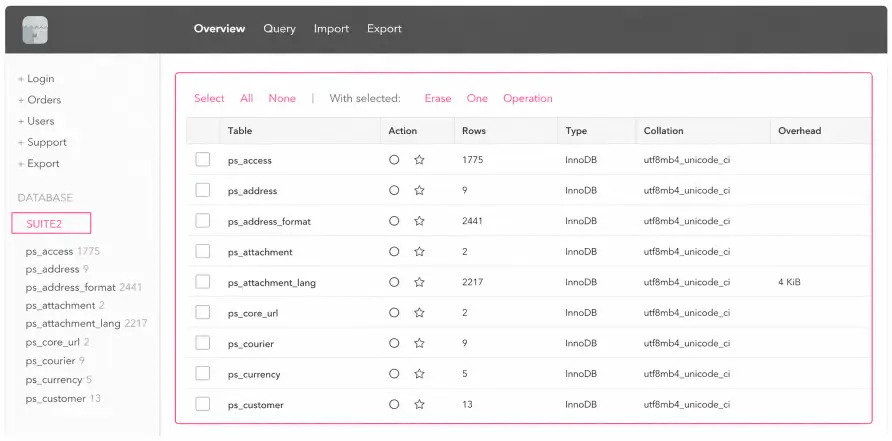
In PrestaShop, the database is a critical piece. A large part of the store lives there: products, categories, customers, orders, carts, combinations, pricing rules, modules, settings and order statuses.
When the database is slow, the store feels it in very sensitive areas. It can affect product listings, the internal search engine, filters, the admin panel and even the checkout.
That is why it is not enough for the hosting provider to say that databases are included. You need to assess whether the environment is prepared to respond properly when the store has real activity.
3. Enough memory to work without blocks
Memory is one of the most important and least visible points. People often talk about available space, but not about the resources needed to run processes.
In a PrestaShop store, memory has a particular impact on tasks such as:
- Importing products.
- Updating modules.
- Generating combinations.
- Clearing cache.
- Processing orders.
- Working with images.
- Managing large catalogues.
- Loading complex areas of the admin panel.
A store may look lightweight from the outside but need resources when you work on it from the inside. If the hosting has limits that are too tight, any normal operation can become a problem.
4. NVMe storage
NVMe storage does not fix everything, but it helps the store have a faster foundation. PrestaShop constantly moves files, images, cache, modules and theme resources. If the storage is slow, every small operation can add extra delay.
This is especially noticeable in stores with many images, broad categories or heavy themes. The user does not know whether the problem comes from the disk, the database, PHP or a module. They only feel that the store is slow.
And when a store is slow, it sells worse.
5. Backups designed for e-commerce
Backups are essential for any website, but in an online store they are even more important. PrestaShop changes constantly: orders come in, customers register, stock changes, modules are updated and products are modified.
That is why it is not enough to have “backups included”. You need to know how they work.
Before hiring a hosting plan, it is worth checking:
- How often backups are created.
- How long they are kept.
- Whether they include files and database.
- How they are restored.
- Whether a restoration could affect recent orders.
- Whether you can restore a specific part or only the full store.
Restoring an online store is not the same as restoring an informational website. If it is done badly, you can lose orders, customers or stock changes. That is why the backup system must be clear and reliable.
The mistake of choosing PrestaShop hosting only by price
It is normal to look at the price, especially when you are starting an online store. The problem appears when price becomes the only criterion.
Cheap hosting may seem enough during the first few weeks, but it can fall short when the store starts to have activity. Then the initial saving turns into lost time, technical problems and possible lost sales.
The symptoms are usually quite clear:
| Signal | What may be happening |
|---|---|
| The PrestaShop panel loads slowly | Lack of resources, slow database or heavy modules |
| Categories take too long to load | Heavy images, demanding filters or slow queries |
| The checkout gets stuck | Problems with modules, server, database or payment methods |
| Imports fail | Memory limits, execution time limits or process limits |
| 500 errors appear | Internal conflicts, PHP, permissions, memory or server issues |
| Support does not give clear answers | Lack of specialisation or limited technical visibility |
The key is to understand that hosting is not just a cost. In e-commerce, hosting is part of the buying experience.
Which parts of PrestaShop usually consume the most resources
Not every area of a PrestaShop store has the same weight. Some parts are especially sensitive and should be considered before choosing hosting.
Product catalogue
The more products you have, the more work the store has to do. But the number of products does not explain everything. Combinations, attributes, images, pricing rules and filters also have an impact.
A store with few products but many combinations can consume more resources than another store with more simple products.
Images
Images are one of the most common causes of slowness in e-commerce. A store needs good photos to sell, but if images are uploaded too heavy or poorly optimised, every category and every product page becomes slower.
Here, hosting helps, but it does not perform miracles. A good PrestaShop store needs fast infrastructure and good image optimisation.
Modules
Modules expand PrestaShop’s functionality, but they can also add load. Some modules make constant queries, load unnecessary scripts or create conflicts with other modules.
That is why a professional store should not install modules just for the sake of accumulation. It is better to work with the modules that are truly necessary, review their impact and remove anything that does not add value.
Filters and internal search
Filters are very useful for selling, but they can be demanding on the database. Filtering by size, colour, price, brand, availability or attributes requires information to be queried and sorted.
If the store has a large catalogue and the hosting does not respond well, filters can become a slow area.
Checkout
The checkout is the most delicate part of the store. If a category fails, the user may continue browsing. If the checkout fails, the sale is lost.
Payment methods, carriers, discount codes, taxes, validations, external scripts and the database all play a role here. That is why hosting needs to be especially stable in this part of the process.
Shared hosting, VPS or dedicated server for PrestaShop
Not every PrestaShop store needs the same type of hosting. The decision depends on the size of the project, the catalogue, traffic, modules and the real importance of the store within the business.
| Type of hosting | When it may make sense | Risk if you choose badly |
|---|---|---|
| Professional shared hosting | New or small stores with a controlled catalogue | Falling short if the plan is too limited |
| VPS | Growing stores with more traffic or technical needs | Requires better technical management |
| Dedicated server or advanced solution | Established e-commerce with high volume or complex integrations | Higher cost if it is not properly used |
Professional shared hosting can be enough for a small store if it has good resources and good support. Not every store needs a VPS from day one.
The important thing is not to confuse “shared” with “basic and saturated”. Good shared hosting can work well for an initial store, while a poorly managed VPS can also cause problems.
Checklist before hiring PrestaShop hosting
Before choosing hosting for your store, review these points calmly:
- Which PHP versions does it support?
- Can you change PHP from the control panel?
- Which MySQL or MariaDB version does it use?
- What is the memory limit?
- Does it include NVMe storage?
- What backups does it create?
- Does it include SSL?
- Does it allow access to logs?
- Is support available in Spanish?
- Is there a possibility to upgrade resources?
- Does it include a PrestaShop installer?
- What real limits does the plan have?
- Can they help you with a migration?
- Is it prepared for a store with modules?
- Does the plan make sense for your current stage?
This list matters because many commercial pages highlight the most attractive features, but do not always explain the real limits of the service. And those limits usually appear when the store starts working.
Installing PrestaShop is not the same as having a store ready to sell
Many hosting providers highlight that you can install PrestaShop in one click. That is convenient, but it should not be confused with having a store ready to sell.
After installing PrestaShop, the store needs to be configured properly. This includes SSL, friendly URLs, payment methods, carriers, taxes, transactional emails, images, modules, cache, analytics, categories, product pages and real purchase tests.
An online store is not ready just because it appears on screen. It is ready when the user can browse, add products to the cart, pay without problems, receive confirmations and enjoy a smooth experience.
Hosting is the foundation, but the store must be properly configured on top of that foundation.
When you should migrate your PrestaShop store
Migrating a PrestaShop store can feel intimidating, but staying on hosting that no longer responds can also become expensive.
It makes sense to consider a migration when problems like these keep repeating:
- The store loads slowly on a regular basis.
- The admin panel becomes heavy.
- Imports fail.
- You cannot properly change the PHP version.
- The checkout gives errors.
- Support does not help you find the source of the problem.
- Resources fall short.
- Backups do not give you confidence.
- You are investing in SEO or campaigns and the technical side is slowing you down.
A well-executed migration should review files, database, PHP, modules, theme, SSL, DNS, emails, cache, redirects and purchase tests. It is not just about moving the website, but about making sure the store continues to work correctly after the change.
PrestaShop hosting in Spain: when it makes sense
If your store mainly sells in Spain, it makes sense to consider hosting with nearby infrastructure, Spanish support and a Spanish IP. Not because this is a magic solution, but because it reduces friction.
Server proximity can help with response times for national users. Support in your language makes it easier to explain technical incidents without barriers. And infrastructure aimed at the Spanish market can fit better with businesses that need to solve problems clearly and quickly.
In an online store, every friction point matters. Especially when there are orders, customers or campaigns running.
JC Hosting for PrestaShop stores
At JC Hosting, we understand hosting as a real part of the business, not just a space where a website is uploaded. And in a PrestaShop store, this matters even more, because behind every product page, every cart and every order there is an infrastructure that needs to respond.
Our plans are designed for projects that need a serious, stable and clear foundation:
- NVMe storage.
- cPanel.
- Softaculous.
- LiteSpeed.
- Daily backups.
- Spanish IP.
- 24/7 support by ticket in english.
- Plans with defined resources.
- Infrastructure designed for websites and stores that need to work, not just be online.
If you are creating a PrestaShop store or your current e-commerce is starting to fall short, hosting should not be an invisible concern. It should be a calm foundation on which you can build, sell and grow without every step forward becoming a technical problem.
Because an online store does not just need to be published. It needs to load well, respond well and hold up when the business starts moving.