When someone tries to access their email through the browser and can’t, the same thing almost always happens. First they try once. Then again. Then they change the password. Then they start wondering whether the problem is with the email account, the browser, the hosting, or the account itself. And in the end, something that seemed simple turns into a completely absurd waste of time.
It is a much more common situation than it seems. It does not matter which provider you use. When webmail access fails, the urgency is always the same: you need to get in, check whether the mailbox is working, and fix it as quickly as possible.
In this article, we are going to look at what to check when you cannot access your hosting webmail, what errors are usually behind it, and how to tell whether the problem is temporary or whether the real issue is with the service itself.
What is hosting webmail
Webmail is access to your email through the browser. Instead of depending on Outlook, Thunderbird, or your mobile app, you can log in directly from a URL and manage your inbox from there.
It is mainly useful for three things: checking whether an email account is actually working, getting quick access from any device, and ruling out whether the problem is with the email itself or with the program you use to access it.
That is why, when something goes wrong, webmail is usually one of the first checks worth making.
What to check if you can’t log in to webmail
Before changing settings or assuming that your email has stopped working, it is worth checking the basics. Very often, the problem is not where it seems to be.
1. Enter the full email address
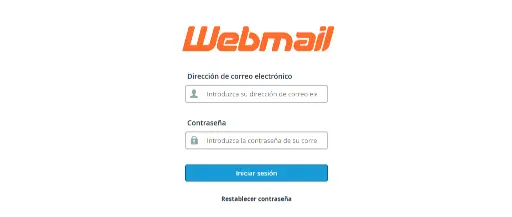
One of the most common mistakes is trying to log in with an incomplete username. In most webmail logins, the username must be the full email address: name@yourdomain.com
It sounds obvious, but it fails more often than it should.
2. Make sure the password is the current one
Another classic. The browser has saved an old password, the password manager autofills one that is no longer valid, or someone changed the password weeks ago and it was never updated on all devices.
Before trying anything else, make sure the mailbox password is actually the right one.
3. Try incognito mode or another browser
Sometimes access fails because of cache, cookies, corrupted sessions, or badly saved autofill data. Do a clean test: open an incognito window, go to webmail manually, and type the username and password without autofill.
If it works there, the problem was not with the mailbox.
4. Check whether the mailbox is still active
It may also happen that the account is no longer active, was set up incorrectly, or has had some change that was never reviewed.
If you have access to the hosting panel, it is worth checking that the mailbox exists, is not suspended, has not exceeded its storage quota, and that the password was saved correctly.
5. Check whether the problem only happens in webmail or on every device
This point is key to diagnosing the issue properly. If you cannot log in through webmail, Outlook, or your mobile phone, the problem is usually with the mailbox, the password, or the service itself.
If webmail works but your email program does not, then you are almost always dealing with an IMAP, POP, or SMTP configuration issue. And that changes the whole approach completely.
You can learn more about that here: How to set up your business email in Outlook step by step (simple guide)
Before changing settings in Outlook or on your phone, it is a good idea to first check whether the account is working properly by logging in through the webmail on its own domain. To do that, replace mydomain.com with your real domain in this address: https://mydomain.com:2096/
Common errors when trying to access hosting email
Although every provider presents it differently, the errors tend to repeat themselves quite often.
Incorrect password
This is the most common one and, in many cases, the most absurd. Not necessarily because the password is actually wrong, but because a different one is being used without realising it.
Confusing access URL
Some providers make email access far from intuitive. It may change depending on the domain or rely on paths the client does not clearly understand. In many cases, access is usually through a route such as https://yourdomain.com:2096/ or https://yourdomain.com/webmail, always using the client’s own domain.
When that happens, there is no longer just a technical problem. There is also a usability problem.
The email works, but web access does not load properly
Several causes may be behind this: an overloaded browser, interfering extensions, a temporary service issue, or incidents within the environment where the email is running.
You don’t know whether the email is failing or your email program is
This is very common among small businesses and self-employed professionals. They think “the email is down”, when in reality the mailbox works and the only issue is the local configuration on one device.
That is why webmail is still such a useful test: it helps you separate one thing from the other.
When the problem is not webmail, but the service behind it
This is the important point. Sometimes the problem is not that you cannot access your email today. Sometimes the problem is that everything around the email creates too much friction: unclear panels, confusing configurations, slow support, a lack of real help when something goes wrong, and the constant feeling of always putting out fires.
And when that happens, we are no longer talking about a simple incident. We are talking about an infrastructure that does not support the pace of your business.
Because email should not be a source of stress. It should be a basic tool that simply works.
How to know whether you need to review your hosting
There are fairly clear signs that the problem is no longer just a one-off. For example, you constantly access your email with doubts, every new account takes too much effort to set up, any change creates issues, when something fails nobody gives you a clear answer, or support takes longer than it reasonably should to help you.
If that sounds familiar, you probably do not just need to fix today’s access issue. You need to review whether the service behind it is really up to standard.
At JC Hosting, we approach it differently
At JC Hosting, we understand that email is part of the day-to-day running of a business. It cannot depend on improvisation, confusing access points, or endless tickets just to solve something basic.
That is why we work with infrastructure designed to give you clarity, support, and a stable foundation from the start.
It is not just about having an email account created. It is about making sure it works when you need it. And that, if something goes wrong, you know what to do and have a quick response.
Conclusion
When you cannot log in to your hosting webmail, the worst thing you can do is start changing things without knowing where the problem is.
First, check the essentials: the correct username, the current password, a test in incognito mode, the real status of the mailbox, and the difference between an access issue and a configuration issue.
Many times, it is solved quickly. But other times, that small issue reveals something bigger: a poorly set up service, an unclear system, or one that takes up more time than it should.
And that is when it is worth stopping and asking a simple question: is the problem today’s email access, or the system I have behind it?
If your hosting makes something as basic as managing your email more difficult than it should be, maybe you do not need more patches. You need a better foundation.